Author: Maxi
Mod Website: https://forums.ahwoo.com/threads/stageinfo.905/
Downloads: 815
Followers: 1
Outdated Mod
This mod is not known to work with the latest version of Kitten Space Agency. Proceed with caution.
StageInfo has been archived.
As of KSA 2026.7.6.4939, the stock game's reworked Sequence UI now shows per-sequence Delta V, TWR, and fuel bars directly in the in-flight staging window and therefore has the core readouts StageInfo was built to add. With stock now covering the essentials (and more on the way), the mod is retired.
The final release, v0.6.0 (validated against KSA 2026.7.5.4892), stays available and may keep working on later builds, but it will neither be tested nor be updated.
Thanks to everyone who used it :)
Extra info and flight performance readouts in the stock staging window for Kitten Space Agency.
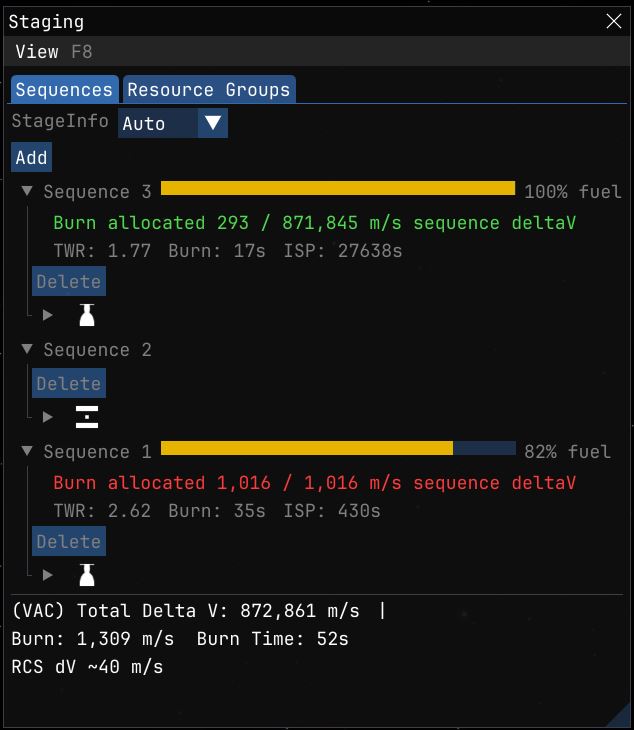
The stock staging window computes per-sequence Delta V and TWR in the vehicle editor only, with a fixed vacuum / sea-level toggle. StageInfo adds its readouts to the same window (both the Sequences and the Resource Groups tab) so they also work in flight, and goes deeper: burn time, ISP, TWR against a selectable body's gravity, live fuel state, RCS budgets, and a corrected multi-stage burn duration for auto-burns.
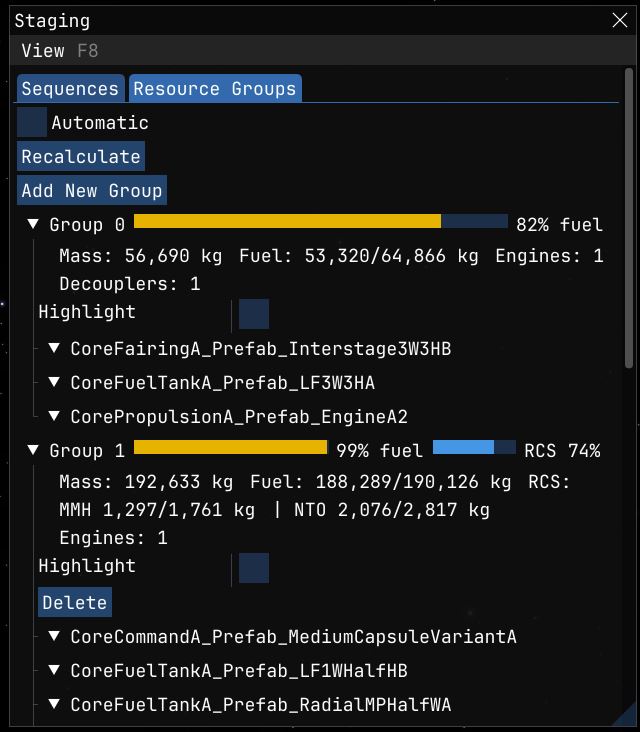
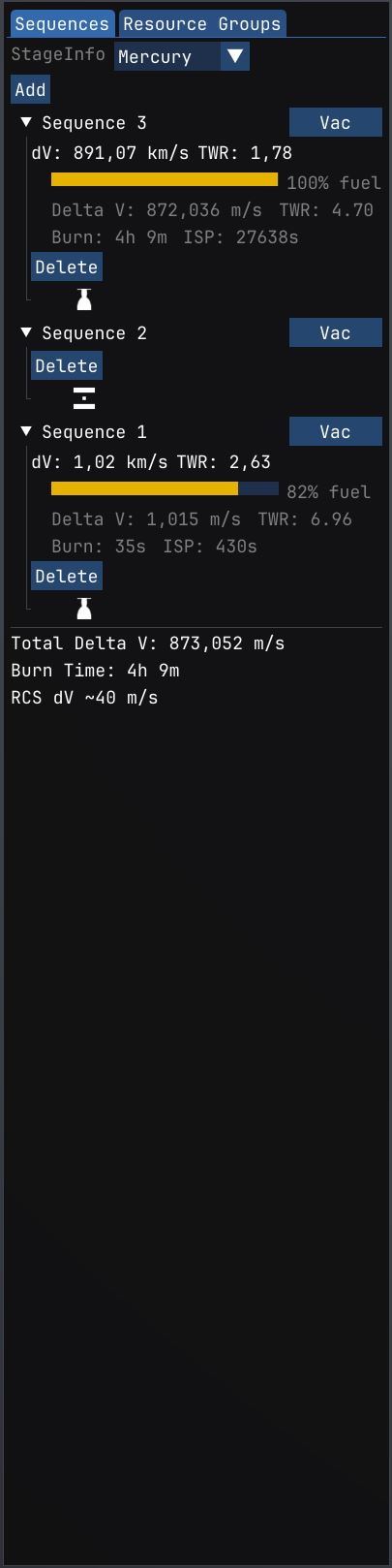
A mode selector sits at the top of each tab; per-sequence and per-group numbers render inline in the tree (with fuel and RCS bars on each header), and the vehicle totals sit in a footer below. The stock window keeps full ownership of the tree and all editing; StageInfo only adds numbers.
Features
- Per-sequence Delta V, TWR, burn time, ISP, and live fuel fraction in flight. A fuel bar sits on each sequence header; expand a sequence to see the numbers inline, above its parts. When a burn is planned, the row shows how much of its dV the burn consumes, colored green to red by consumption.
- Per-group mass, fuel pool, engine count, decoupler count on the Resource Groups tab, inline under each group with a fuel bar and an RCS bar on the group header. Substances no active main engine can consume are listed as RCS entries (e.g.
MMH 1,180/1,761 kg) with a hover tooltip for the full substance name and current/max mass. Shared tanks (e.g. LFOX feeding both the main engine and a vernier thruster) stay in the main fuel pool so nothing is counted twice. - RCS dV budget as a footer line (
RCS dV ~X m/s). Hover for an engineering tooltip listing effective ISP, total propellant, and scalar peak thrust. - Display modes Auto / VAC / ASL / VAC+ASL / Planning for previewing dV under different ambient conditions (Planning lets you pick any celestial body in the current system).
- Editor readouts in the vehicle editor's staging window: the same per-sequence Delta V / TWR / burn time / ISP line, with a body selector for the TWR reference gravity and a Vacuum toggle for bodies with atmosphere. The stock editor also shows dV/TWR, but fixed to standard gravity and a vacuum / sea-level toggle; StageInfo's numbers account for the selected body's gravity and reachable-only propellant.
- Totals footer with total Delta V, planned burn dV, and burn time. Turns red when the planned burn exceeds available dV.
- Corrected burn duration for multi-stage burns: the stock game computes burn duration as if the full dV came from the current stage, which underestimates the time for staged burns. StageInfo rewrites the
BurnDurationshown in the burn gauge and, more importantly, theIgnitionTimeused by the auto-burn logic, so staged burns ignite at the correct lead time.
Installation
- Install StarMap.
- Extract the SpaceDock zip into
Documents\My Games\Kitten Space Agency\mods\StageInfo\. - The game auto-discovers new mods on next launch.
Dependencies
| Package | Purpose | Tested version |
|---|---|---|
| StarMap | Mod loader | 0.4.5 |
License
MIT. Source code, issue tracker, full changelog: https://github.com/Maximilian-Nesslauer/KSA-StageInfo
Forum thread: https://forums.ahwoo.com/threads/stageinfo.905/
Stats for StageInfo
Downloads over time
Downloads per version
New followers per day
Top Referrers
- spacedock.info
- sd1a.52k.de
- sd-prod-live.52k.de
- sd1b.52k.de
- www.google.com
- sd-prod-stage.52k.de
- forums.ahwoo.com
- None
- www.perplexity.ai
- en.reddit.com
Export Raw Stats
Raw stats are from the beginning of time until now. Each follower and download entry represents one hour of data. Uneventful hours are omitted.